

2026-09-15
Nural Choudhury
A content audit is a catalogue of every piece of content you own, scored against what it is supposed to do, so you can decide what to keep, fix, merge or kill.
A redesign or content strategy that cannot start because nobody knows what exists, and the recurring argument about which pages matter that never resolves because nobody has counted.
The scored, owned inventory feeds the information architecture work and the redesign, so both start from what exists rather than from opinion.
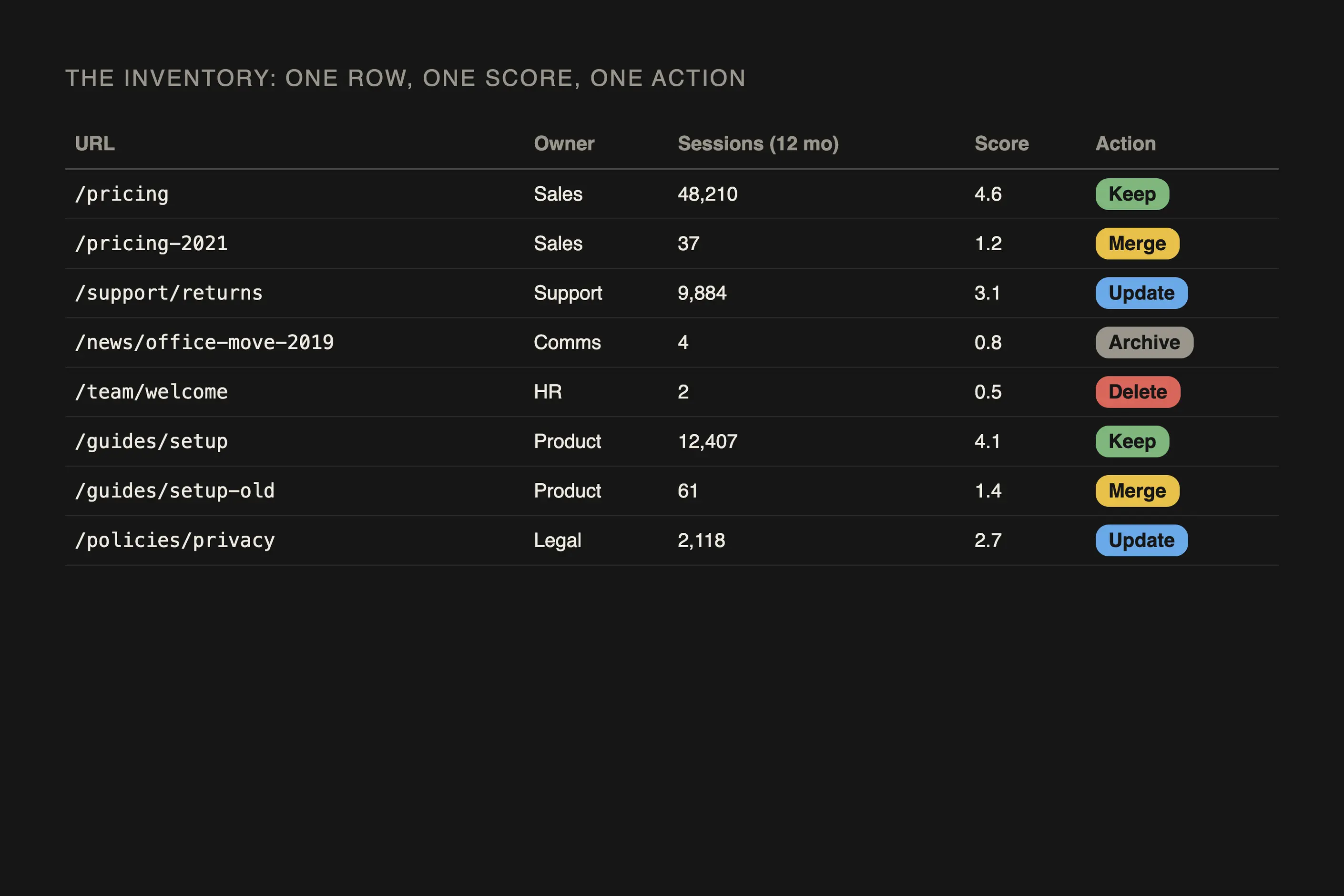
An inventory spreadsheet with a stable identifier and analytics joined to it, a score per item against the agreed criteria, a one-action-per-item decision list with an owner and a date against every row, and a named governance change with a review cycle.
The content inventory is older than the Web, and it arrives from records management, where organisations have always had to decide what to keep. What content strategy added was the second half: scoring each item against a purpose, so the list produces a decision rather than a total.
The audit became central to the discipline with Kristina Halvorson’s Content Strategy for the Web in 2009, which argued that you cannot plan content you have not counted. The ROT test, which asks whether each item is redundant, outdated, or trivial, comes from the same tradition and remains the fastest scoring rubric available. Automated tools now build ROT classification and predictive decay detection directly into the crawl, so it is no longer the only route to a score. However, I still reach for it first because it is fast enough to argue over in a room.
One piece of folk history worth correcting: the audit is widely treated as a redesign activity, something you do once, at the start of a project. That is where most audits happen, and it is also why most of them are wasted. An audit describes a moment. Run it once, and it is out of date by the time the project ships.

Six steps, in order. Steps 1 and 2 are mechanical, and a crawler tool does the collection now, not a person. Steps 3 to 6 are judgement, and you cannot hand those to software.
1. Fix the scope before you touch a crawler. Name the properties in scope, the content types in scope, and, explicitly, what is out. Write the exclusions down: archived sections, content behind a login, third-party embeds, anything owned by another team. An audit with no stated exclusions expands until it is abandoned.
2. Build the inventory. A crawler such as Screaming Frog, Semrush, Ahrefs Site Audit, or Lumar collects one row per item now, with a stable identifier (the URL for web content), the title, content type, owner, date last updated, and word count. Most of them pull in analytics and search data as they crawl. What I still do by hand is check the tool’s coverage and spot-check the highest-value pages, because no crawler sees content behind a login, inside an application, or generated on the fly.
3. Attach the numbers you already have. Join analytics to the inventory on the identifier: sessions, engagement, conversions, search impressions and rankings. Do not collect new data at this stage. You are looking for which content nobody reads, and you already know.
4. Score each item against criteria you agreed in advance. Set the criteria before anyone sees a score, or the scoring will justify a decision somebody has already taken. Four criteria carry most audits: is it accurate, is it still relevant to a live user need, does it sound like us, and is it accessible. Score independently if more than one person is scoring, then compare and argue about the items you disagree on. Those are where the insight is.
AI tooling can now predict decay, draft metadata, and shortlist stale candidates before you start scoring. I use it for that shortlist, never for the verdict: Sanity’s content-agent documentation stages every AI-proposed fix as a draft for human approval, and Palantir’s January 2026 guidance says plainly that automated tooling is not a replacement for human oversight. AI cannot judge accuracy, relevance, or brand fit on its own, which is exactly what this step protects.
5. Sort every item into one action. One action per item, not a rating: keep, update, merge, archive, delete. If an item has two possible actions, you haven’t decided. Assign an owner and a date to each one, because an action with no owner or date doesn’t happen.
6. Decide what changes so the audit does not recur. If the same decay produced the same problem, the audit is a symptom. Name the governance change: who reviews what, on what cycle, and what triggers an off-cycle review.
A 900-page site. The crawl returns 900 URLs, and manual checking finds another 140 behind a login, so the real inventory is 1,040.
Analytics shows 620 of those pages took fewer than ten sessions in twelve months. That is a filter, not yet a finding. Applying ROT to those 620: 180 are redundant, saying the same thing as a better page; 300 are outdated, describing products, prices or policies that have changed; 140 are trivial, single-paragraph pages that should never have been pages.
The actions fall out of that. The 180 redundant pages are merged into the better version and redirected, which concentrates search authority instead of splitting it. The 300 outdated pages are split by whether anyone still needs the topic: those that do get an update with an owner and a date; those that do not get archived. The 140 trivial pages are deleted.
That leaves 420 pages carrying real traffic, where quality scoring is worth doing properly. The point of the arithmetic is that it reduced expensive judgement work from 1,040 items to 420.

Four failure modes, and the first is the common one.
The spreadsheet nobody opens. The most likely outcome of a content audit is a thorough spreadsheet and no change to the content. The audit produces recommendations; the recommendations need resources; the resource was budgeted for the redesign, not the content work; and the file goes quiet. I will not start an audit now without a name against the actions, or the audit produces a document, not a decision.
It is out of date immediately. An audit is a photograph, and on any property with active publishing, the findings begin decaying the day you finish. Rolling audits, which review a section at a time on a cycle, are now the standard option rather than the alternative to a single heroic audit, and teams that do this well re-audit routinely rather than waiting for the next redesign to force the issue.
Quality scores are opinions wearing numbers. You can assess accuracy and accessibility against something external. Relevance, brand fit and usefulness cannot. Give those a 1-to-5 score, and you produce a number that looks objective, averages neatly, and encodes whatever the scorer already believed. I score independently, compare, and record the reason rather than the number.
Traffic is the wrong sole criterion. Low-traffic content is not automatically waste. Legal notices, support pages for rare failures, and documentation for one large customer all earn their place with almost no sessions. I have seen a low-traffic support page earn its place by preventing one expensive call, and cutting on traffic alone would have deleted it.
The inventory is the list, the audit is the list plus a judgement about each item. Do not report an inventory as an audit, because the list on its own answers nothing.
Always start with a sample. A sample of 50 to 100 items tells you the shape of the problem and whether a full audit is worth funding. Commit to a full audit when you already know what it will find and need the completeness for a migration.
Whoever owns the outcome, with at least one person who did not write any of it. An author scoring their own content scores its intent rather than its effect.
Continuously, on a rolling cycle, rather than once a year in one effort. Set the cycle by value: pages that drive traffic and revenue get reviewed quarterly; the long tail annually or on a trigger.
Orphaned content is the audit’s most useful output. If no name can be attached to an item, that is the finding, and the decision is usually to archive it.
| What it is | A full inventory of content plus an assessment of each item against agreed criteria |
|---|---|
| Also called | Content inventory (the list alone) and content audit (the list plus the judgement). The two are often conflated, and the distinction matters: an inventory is a fact, an audit is an opinion |
| Where it comes from | Content strategy practice. Kristina Halvorson’s Content Strategy for the Web (2009) put the audit at the centre of the discipline |
| Common scoring shorthand | The ROT test: redundant, outdated, trivial |
| Hardest part | Not the inventory. Getting anyone to act on it |

Information architecture structures content so people can find it: choosing an organisation scheme, writing labels, building navigation and search, and testing whether the structure holds under a real task.
Read it
Data analysis for design is the practice of testing decisions against measured evidence, usage data, and controlled experiments, rather than defending them by opinion alone.
Read it
Task analysis is the systematic study of how people currently perform a task, breaking it down into the steps, decisions and knowledge each one requires.
Read it
User research is the systematic study of what users do, need and struggle with, combining qualitative depth with quantitative scale to ground design in evidence.
Read it
An idea evaluation matrix is a structured scoring tool that ranks competing ideas against a shared set of weighted criteria, typically value, effort, and risk, so a team can compare options that all look plausible consistently rather than by whoever argues loudest.
Read it
A service blueprint is a diagram that maps what a customer experiences against the staff actions and systems that produce it, on one shared timeline.
Read it