

2026-09-15
Nural Choudhury
Design documentation earns its keep when it removes a decision from a developer’s inbox, not when it is complete.
Most of what gets written removes nothing: it restates what the prototype already shows, or specifies a state nobody would ever build differently. The only real test is whether a page stops a question before someone has to ask it.
A handoff where the developer opens the file and still has to guess what happens on error, what happens when a call is slow, and which of six similar buttons matters. Every guess becomes a message, then a meeting, then a rebuild once the client sees the wrong thing shipped.
Hand over a specification that answers the questions a static screen cannot: what an element is, what it does, what happens after, and what data it needs. You commit to a behaviour, not just a look, and a developer can build without waiting on you.
Annotated states for everything a screen leaves ambiguous, a data specification for anything touching an API or a CMS, one named owner for keeping both current, and fewer clarifying questions logged against the build than the last handoff produced.
Test every element against four questions before you document it: what it is, what it does, what happens after, and what data it needs. If the answer to all four is obvious from the screen itself, you must not document it: a note that restates the screen adds length without removing a decision.
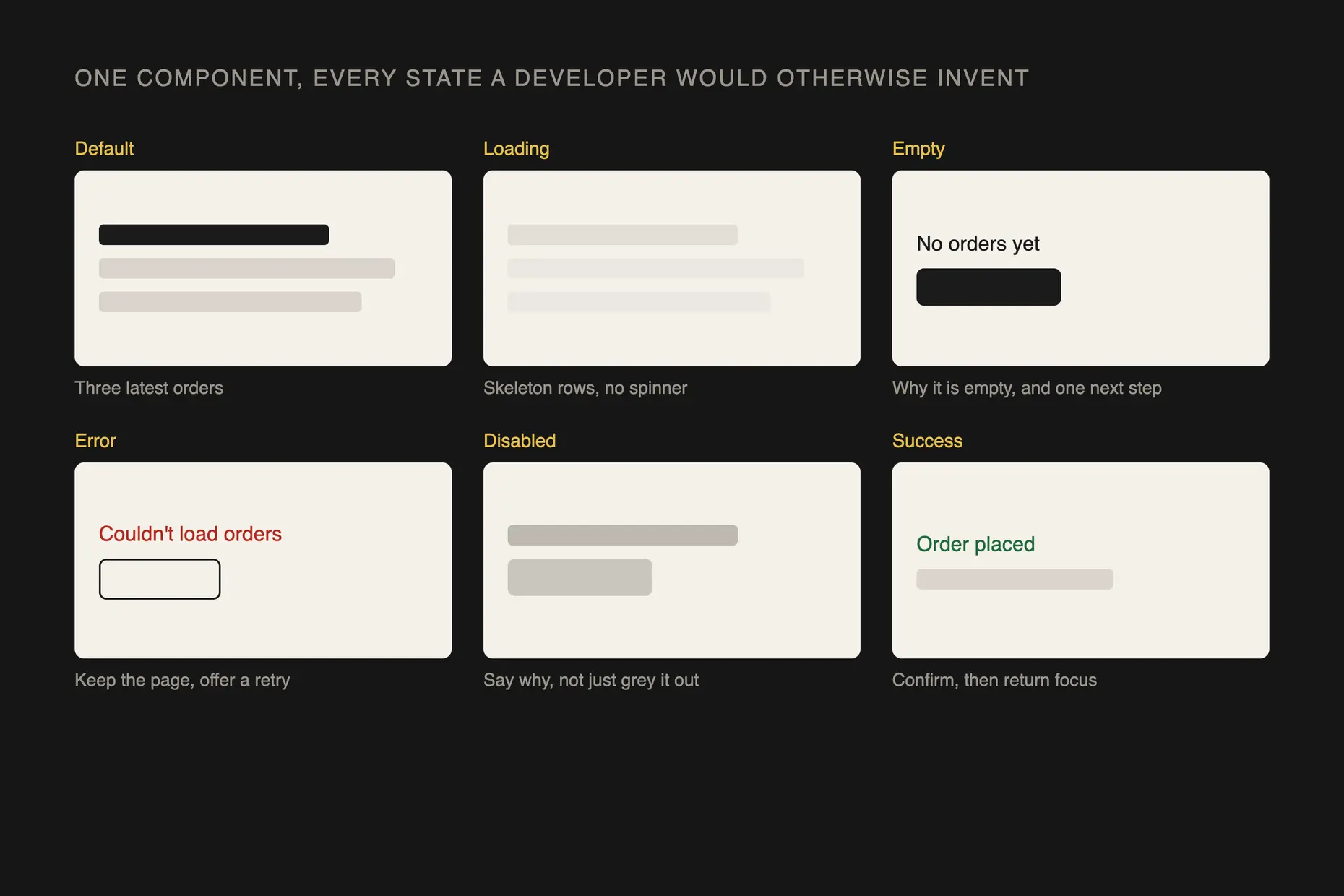
You must specify every state a developer would otherwise have to invent, not just the one the client will see in review. Error, empty, loading, disabled, and success states are the ones missing most often, because they are the least visible on a static screen. Name each one and say what triggers it.
Name every element the way the design system already names it, not with a fresh description invented for the redline. A developer who cannot match “primary button” to the component library builds a new one instead of reusing the existing pattern, and that duplication compounds with every handoff that repeats it.
Attach a data specification wherever a screen depends on live content: the source, the required fields, the validation rules, and the fallback when a field is empty or a call fails. A developer who does not know the fallback will invent one, and their invention rarely matches the design.
Version the documentation with the design file. When a screen changes materially, the annotation must change in the same pass, not in a follow-up ticket that never gets raised.
Give every document one named owner. A specification nobody owns goes stale first, because nobody notices when it stops matching the build.
I hand over the four-question test and keep the final read before anything reaches a developer. A designer can learn quickly to ask what an element is, what it does, what happens after, and what data it needs. Judging whether the answer is complete takes longer to build, so I keep that judgement until I trust it in someone else.
What I check, without redoing the work myself, is the edge cases. I ask one question of every handoff before it goes out: if this breaks at three in the morning, does the developer already know what it is supposed to do? If the answer needs a guess, the documentation is not finished.
The conversation that goes wrong is when a designer points at the prototype and says it is all in there. A clickable prototype shows one path; it does not state the rule behind it. I ask what happens on every path the prototype does not show, and that question also fixes the designer who has documented nothing, because it forces the states they skipped into the open.
The opposite failure is a designer who documents everything: every colour, every margin, a hover state on a heading that will never receive one. I do not edit that down myself. I ask what decision each annotation removes, and I let them cut the ones that remove none.
I do not review every specification personally forever. Once a designer has run the four-question test cleanly on three or four handoffs in a row, I move from reading the document to reading the developer’s questions instead, because the questions tell me faster than the page does whether the standard held.
I know a designer has got it when the clarifying questions stop coming back to me and start going straight into the spec instead.

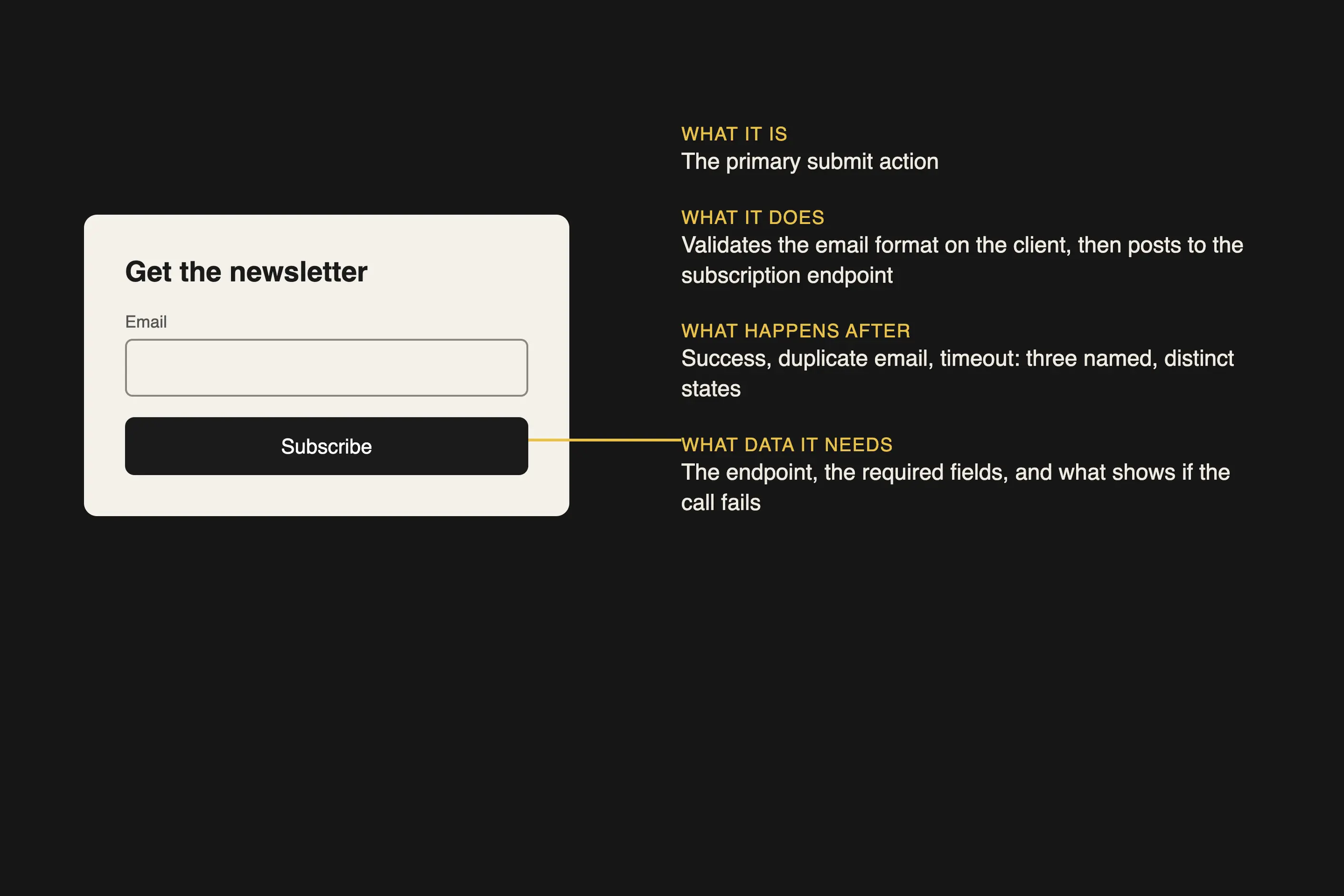
Take a sign-up form with one email field and a submit button. The screen shows the field and the button. It does not show what happens when the email is already registered, when the network call times out, or when the button is pressed twice before the first response returns.
The button needs four short answers:
Four short answers remove three decisions a developer would otherwise have made alone. Nothing else on that screen needs documenting, because nothing else is ambiguous.
Documentation that nobody reads is the most common failure, and it is usually a length problem before it is a content problem. A page that takes ten minutes to read gets skimmed once and then ignored, and a developer under deadline pressure will guess rather than search for the answer inside it.
The second failure is documentation that duplicates the prototype instead of stating the rule behind it. Wireframes and prototypes cover this gap directly: a prototype demonstrates one path; it does not specify the rule that produced it, and treating the two as the same artefact is how error states go undocumented.
The third failure is documentation that goes stale the sprint after it is written. A screen changes, the annotation does not, and the gap between them becomes a new source of the exact ambiguity the documentation was meant to remove. I have watched a team trust a six-month-old specification over the current build, because nobody had told them it was out of date.
Enough to answer what it is, what it does, what happens after, and what data it needs, and no more. If an element’s behaviour is obvious from the screen, documenting it removes nothing and only adds length nobody will read.
Every state a developer would otherwise have to invent, yes. Error, empty, loading, and disabled states go missing most often, because they are the least visible on a static screen.
One named person, tied to the design file, not the team collectively. Shared ownership is how a specification goes months out of date without anyone noticing.
No. A prototype demonstrates one path and cannot show why that path was chosen or what happens on the ones it doesn’t cover, so anything it leaves out still needs to be written down.
When the clarifying questions logged against a build drop, and the ones that remain are about product decisions rather than what the screen meant. A specification that keeps getting the same question back has not answered it.
| Fact | Detail |
|---|---|
| Core test | Whether the page removes a decision the screen alone leaves open |
| Minimum states to specify | Error, empty, loading, disabled, and success |
| Minimum data-specification fields | Source, required fields, validation rules, and fallback behaviour |
| Ownership | One named owner per specification, tied to the design file |
| Update trigger | Documentation changes in the same pass as the screen it describes |
| Most common failure | Duplicating the prototype instead of stating the rule behind it |

A wireframe shows a screen’s structure without visual design, and a prototype simulates its behaviour, so a team can test both before committing to development.
Read it
A design system is a governed set of reusable components, patterns and rules that a team uses to build consistent digital products at scale, and it is neither a static style guide nor a component library on its own.
Read it
Digital accessibility is the practice of building products people can use, whatever their permanent, temporary, or situational disability, measured against a published standard rather than opinion.
Read it
A team isn’t misaligned because it lacks a vision; it is misaligned because the cadence that surfaces disagreement before it hardens doesn’t exist.
Read it